Fix issue with dollar sign $ formatting in Colab to HTML conversion
(As of June, 2025) When using Google Colab, dollar signs $ are a special character that are interpreted to mean that you are formatting text as a math formula. A single dollar sign may display correctly but more than one dollar sign in a cell triggers the formatting. This can be incredibly frustrating and there does not appear to be a way to disable this behavior.
The solution is to “escape” the dollar sign $ with a backslash \ so it looks like this in a markdown cell: \$
This will cause it to render correctly in Colab. If that’s all you need, you’re good to go! However, if you need to convert the Colab notebook to an HTML file there can be additional issues with the conversion process interpreting those escaped dollar signs \$ as formula formatting!
Here is the solution: wrap every \$ in an HTML span tag so it looks like this in the markdown: <span>\$</span>
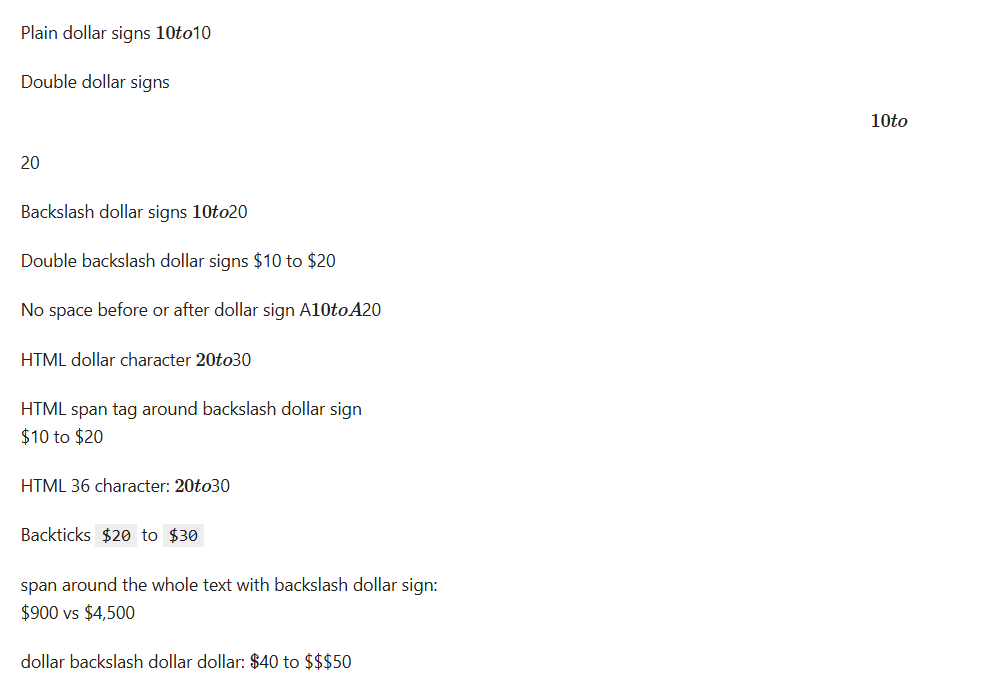
Here’s everything I tried for reference. Span tags around the escaped dollar signs (either individually or around the entire text) are the only thing that works in both Colab and HTML.
Markdown | Works in Colab? | Works in HTML? |
HTML span tag around backslash dollar sign | YES | YES |
span tag around the whole text with backslash dollar sign | Yes | Yes |
Backticks | Yes, but it’s formatted as code | Yes, but it’s formatted as code |
Plain dollar signs | No | No |
Double dollar signs | No. Very much no. | No |
Backslash dollar signs | Yes | No, interpreted as formula formatting |
Double backslash dollar signs | No | Yes |
No space before or after dollar sign | Yes, but often not feasible to have characters in front of the dollar sign | No |
HTML $ character | Yes | No |
HTML $ character | Yes | No |
dollar backslash dollar dollar | Yes - dollar sign looks weird but passable in colab | No |
Screenshot of the HTML output for reference: